|
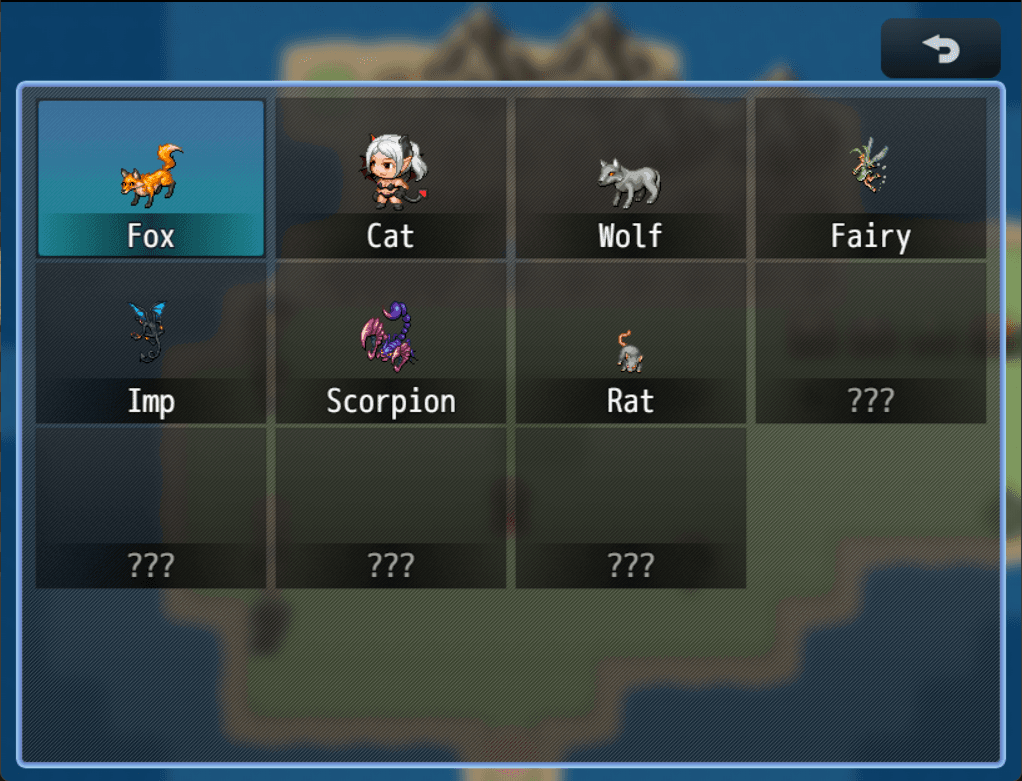
这个插件升级了你的宠物在菜单中显示的方式!不再像你的角色一样显示宠物,这个插件将它们移动到一个全新的菜单中。 此菜单由目录和检查页面组成,提供您所需的所有信息。所有窗口都可以自定义,例如,您可以隐藏等级和经验信息。 可选:未被发现的同伴可以由 „???“ 显示 所有窗口都可以通过使用JavaScript完全自定义
因此… - 玩家可以看到他们的宠物技能,但不能检查或吟唱它们。
- 玩家不能再为他们的宠物装备物品
- 如果不进行定制,此菜单将不会显示当前的HP/MP或受影响的状态,因为它假定召唤出的宠物会自动回复。
- 您可以决定是否显示等级和经验值信息
最终,这些功能可能正是你所希望的,也可能正是你所不希望的,所以是否要包含这个插件取决于你。 传记便签可以分配给任何演员。 <Biography>
Lorem ipsum...
</Biography>
代码片段此插件允许许多代码自定义。以下是一些示例: 经验与统计,无生命值/魔法值/移动速度,无状态这是默认代码,当临时战斗信息对玩家没有用处时(因为召唤宠物时会自动治疗)有用。
在插件管理器中禁用时,等级和经验值不会显示。
[JavaScript] 纯文本查看 复制代码 // constants
const pet = arguments[0];
const faceWidth = ImageManager.faceWidth || Window_Base._faceWidth;
const faceHeight = ImageManager.faceHeight || Window_Base._faceHeight;
// draw
if (!pet) return;
let yName = 0;
if ('Face' == MK.SummoningMenuAddon.statusMenuPortraitStyle) {
this.drawFace(
pet.faceName(),
pet.faceIndex(),
0,
0,
);
yName += faceHeight;
}
if ('Sprite' == MK.SummoningMenuAddon.statusMenuPortraitStyle) {
this.drawCharacter(
pet.characterName(),
pet.characterIndex(),
faceWidth / 2,
this.height / 2,
);
yName += this.height / 2;
}
if ('Battler Sprite' == MK.SummoningMenuAddon.statusMenuPortraitStyle) {
this.drawBattlerSprite(
pet,
faceWidth / 2,
this.height / 2,
);
yName += this.height / 2;
}
this.drawText(
pet.name(),
0,
yName,
faceWidth,
'center',
);
// Level
let x = faceWidth + 20;
if (MK.SummoningMenuAddon.showPetLevel) {
const levelInfoWidth = 160;
const y1 = this.height / 2 - 2 * this.lineHeight();
this.changeTextColor(this.systemColor());
this.drawText(
TextManager.levelA,
x,
y1,
levelInfoWidth,
);
this.resetTextColor();
this.drawText(
pet.level,
x,
y1,
levelInfoWidth,
'right',
);
// EXP
if (!pet.isMaxLevel()) {
this.changeTextColor(this.systemColor());
this.drawText(
MK.SummoningMenuAddon.Vocabulary.exp,
x,
y1 + this.lineHeight(),
levelInfoWidth,
);
this.drawText(
MK.SummoningMenuAddon.Vocabulary.toNextExp,
x,
y1 + 2 * this.lineHeight(),
levelInfoWidth,
);
this.resetTextColor();
this.drawText(
pet.isMaxLevel() ? '-----' : pet.currentExp(),
x,
y1 + this.lineHeight(),
levelInfoWidth,
'right',
);
this.drawText(
pet.isMaxLevel() ? '-----' : pet.nextRequiredExp(),
x,
y1 + 2 * this.lineHeight(),
levelInfoWidth,
'right',
);
}
x += levelInfoWidth + 30;
}
// HP, MP, Atk, Def, etc.
const paramBoxWidth = Math.min(this.contentsWidth() - x, 400);
const xParamBox = this.contentsWidth() - paramBoxWidth;
const w2 = this.textWidth('9999');
const w1 = paramBoxWidth / 2 - w2;
const y2 = this.height / 2 - 2.5 * this.lineHeight();
for (let i = 0; i < 8; i++) {
this.changeTextColor(this.systemColor());
this.drawText(
TextManager.param(i),
xParamBox + Math.floor(i / 4) * (w1 + w2),
(i % 4) * this.lineHeight() + y2,
w1 - 20,
);
this.resetTextColor();
this.drawText(
pet.param(i),
xParamBox + Math.floor(i / 4) * (w1 + w2) + w1 - 20,
(i % 4) * this.lineHeight() + y2,
w2,
'right',
);
}
|
HP/MP/TP 表格,当前状态,& 状态
在插件管理器/数据库中禁用时,级别和TP不会显示。
[JavaScript] 纯文本查看 复制代码 // constants
const pet = arguments[0];
const faceWidth = ImageManager.faceWidth || Window_Base._faceWidth;
const faceHeight = ImageManager.faceHeight || Window_Base._faceHeight;
// draw
if (!pet) return;
let yName = 0;
if ('Face' == MK.SummoningMenuAddon.statusMenuPortraitStyle) {
this.drawFace(
pet.faceName(),
pet.faceIndex(),
0,
0,
);
yName += faceHeight;
}
if ('Sprite' == MK.SummoningMenuAddon.statusMenuPortraitStyle) {
this.drawCharacter(
pet.characterName(),
pet.characterIndex(),
faceWidth / 2,
this.height / 2,
);
yName += this.height / 2;
}
if ('Battler Sprite' == MK.SummoningMenuAddon.statusMenuPortraitStyle) {
this.drawBattlerSprite(
pet,
faceWidth / 2,
this.height / 2,
);
yName += this.height / 2;
}
this.drawText(
pet.name(),
0,
yName,
faceWidth,
'center',
);
let x = faceWidth + 20;
// Basic Info
const y1 = this.height / 2 - 2.5 * this.lineHeight();
if (MK.SummoningMenuAddon.showPetLevel) {
this.drawActorLevel(pet, x, 0 * this.lineHeight() + y1);
}
this.drawActorIcons(pet, x, 1 * this.lineHeight() + y1);
this.placeBasicGauges(pet, x, 2 * this.lineHeight() + y1);
x += 200;
// Atk, Def, etc.
const paramBoxWidth = Math.min(this.contentsWidth() - x, 400);
const xParamBox = this.contentsWidth() - paramBoxWidth;
const w2 = this.textWidth('9999');
const w1 = paramBoxWidth / 2 - w2;
const y2 = this.height / 2 - 2 * this.lineHeight();
for (let i = 0; i < 6; i++) {
this.changeTextColor(this.systemColor());
this.drawText(
TextManager.param(i + 2),
xParamBox + Math.floor(i / 3) * (w1 + w2),
(i % 3) * this.lineHeight() + y2,
w1 - 20,
);
this.resetTextColor();
this.drawText(
pet.param(i + 2),
xParamBox + Math.floor(i / 3) * (w1 + w2) + w1 - 20,
(i % 3) * this.lineHeight() + y2,
w2,
'right',
);
} |
[JavaScript] 纯文本查看 复制代码 // constants
const pet = arguments[0];
const faceWidth = ImageManager.faceWidth || Window_Base._faceWidth;
const faceHeight = ImageManager.faceHeight || Window_Base._faceHeight;
// draw
if (!pet) return;
let yName = 0;
if ('Face' == MK.SummoningMenuAddon.statusMenuPortraitStyle) {
this.drawFace(
pet.faceName(),
pet.faceIndex(),
0,
0,
);
yName += faceHeight;
}
if ('Sprite' == MK.SummoningMenuAddon.statusMenuPortraitStyle) {
this.drawCharacter(
pet.characterName(),
pet.characterIndex(),
faceWidth / 2,
this.height / 2,
);
yName += this.height / 2;
}
if ('Battler Sprite' == MK.SummoningMenuAddon.statusMenuPortraitStyle) {
this.drawBattlerSprite(
pet,
faceWidth / 2,
this.height / 2,
);
yName += this.height / 2;
}
this.drawText(
pet.name(),
0,
yName,
faceWidth,
'center',
);
let x = faceWidth + 20;
// Basic Info
if (MK.SummoningMenuAddon.showPetLevel) {
this.drawActorLevel(pet, x, 0);
}
this.drawActorIcons(pet, x, 1 * this.lineHeight());
this.drawActorHp(pet, x, 2 * this.lineHeight(), 186);
this.drawActorMp(pet, x, 3 * this.lineHeight(), 186);
if ($dataSystem.optDisplayTp) {
this.drawActorTp(pet, x, 4 * this.lineHeight(), 186);
}
x += 200;
// Atk, Def, etc.
const paramBoxWidth = Math.min(this.contentsWidth() - x, 400);
const xParamBox = this.contentsWidth() - paramBoxWidth;
const w2 = this.textWidth('9999');
const w1 = paramBoxWidth / 2 - w2;
const y2 = this.height / 2 - 2 * this.lineHeight();
for (let i = 0; i < 6; i++) {
this.changeTextColor(this.systemColor());
this.drawText(
TextManager.param(i + 2),
xParamBox + Math.floor(i / 3) * (w1 + w2),
(i % 3) * this.lineHeight() + y2,
w1 - 20,
);
this.resetTextColor();
this.drawText(
pet.param(i + 2),
xParamBox + Math.floor(i / 3) * (w1 + w2) + w1 - 20,
(i % 3) * this.lineHeight() + y2,
w2,
'right',
);
} |
技能这是显示技能的默认代码
[JavaScript] 纯文本查看 复制代码 // constants
const pet = arguments[0];
// custom code
if (!pet) return;
this.changeTextColor(this.systemColor());
this.drawText(
MK.SummoningMenuAddon.Vocabulary.skills,
0,
0.25 * this.lineHeight(),
this.contentsWidth(),
'center',
);
this.resetTextColor();
pet.skills().forEach((skill, i) => {
this.drawItemName(
skill,
20,
i * this.lineHeight() + 1.5 * this.lineHeight(),
this.contentsWidth() - 20,
);
}); |
这是显示宠物传记的默认代码
[JavaScript] 纯文本查看 复制代码 // constants
const pet = arguments[0];
// custom code
if (!pet) return;
if (!pet.actor().meta) return;
const biography = (pet.actor().meta.petBiography || '').trim();
const nLines = biography.split('\n').length + 1;
if (biography) {
this.drawTextEx(
biography,
0,
this.height / 2 - nLines * this.lineHeight() / 2,
this.contentsWidth(),
);
} |
使用此代码显示ATK, DEF,…
[JavaScript] 纯文本查看 复制代码 // constants
const pet = arguments[0];
// draw
if (!pet) return;
const y = this.contentsHeight() / 2 - 4.5 * this.lineHeight();
for (let i = 0; i < 8; i++) {
this.changeTextColor(this.systemColor());
this.drawText(
TextManager.param(i),
10,
i * this.lineHeight() + y,
this.contentsWidth() - this.textWidth('99999') - 10,
);
this.resetTextColor();
this.drawText(
pet.param(i),
0,
i * this.lineHeight() + y,
this.contentsWidth() - 10,
'right',
);
} |
|


 窥视卡
 雷达卡


 UID: 1043
发表于 2026-2-5 10:11:16

 提升卡
 置顶卡
 沉默卡
 喧嚣卡
 变色卡
 千斤顶
 照妖镜